WordPress
DataGrail Consent can integrate with WordPress sites using the WP Consent API Plugin. This plugin allows you to manage consent for WordPress plugins and services on your site.
The WP Consent API plugin only affects WordPress plugins that support receiving values from the Consent API and are configured to honor the requests. Consult the documentation for specific plugin interactivity with the WP Consent API.
Configuration
Follow these steps to enable DataGrail Consent to manage the values received by the WP Consent API plugin:
- Install the WP Consent API plugin on your website.
- Deploy DataGrail Consent to your website, enabling the WordPress plugin for the container installed on your website.
The Settings page allows you to enable the WordPress plugin integration for your container:
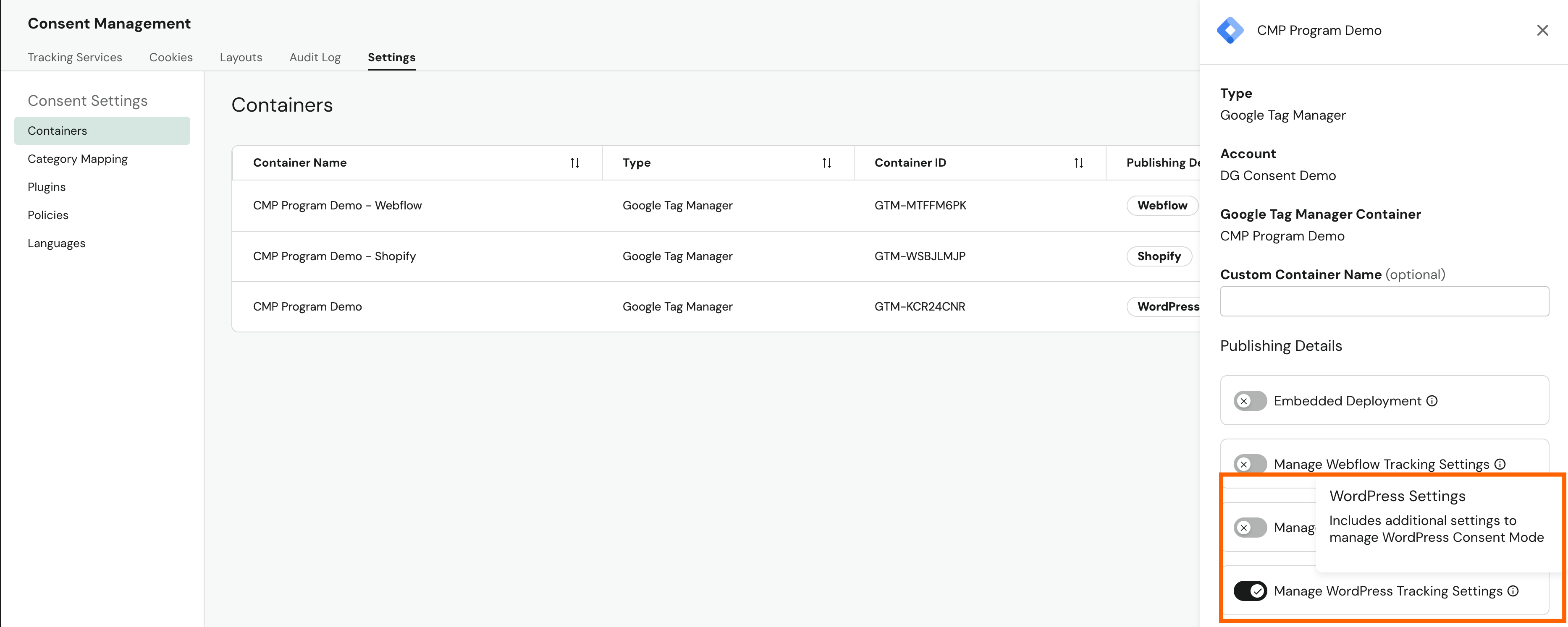
After completing both steps, you can test the plugin and its capabilities using the browser APIs described below.
Testing the Integration
Category Mapping: DataGrail Consent categories map to WordPress categories as follows:
| DataGrail Category | WordPress Category |
|---|---|
| marketing | marketing |
| performance | statistics |
| functional | preferences |
You can test category-specific consent using the wp_has_consent() function:
wp_has_consent('marketing')
=> false
Consent Type: The opt-in consent type will always be returned when DataGrail Consent is enabled:
window.wp_consent_type
=> 'optin'
Disclaimer: The information contained in this message does not constitute as legal advice. We would advise seeking professional counsel before acting on or interpreting any material.