Consent Projects
Consent Projects let you manage multiple brands, sites, or experiences — like a desktop web presence and a mobile app — within a single DataGrail Consent environment. Each project has its own independently configured and publishable consent setup, so changes to one project never affect another.
By default, your account has one project called Default, which contains your existing consent configuration. You can create additional projects for each brand, region, or experience type you manage, and switch between them at any time using the project switcher in the Consent platform header.
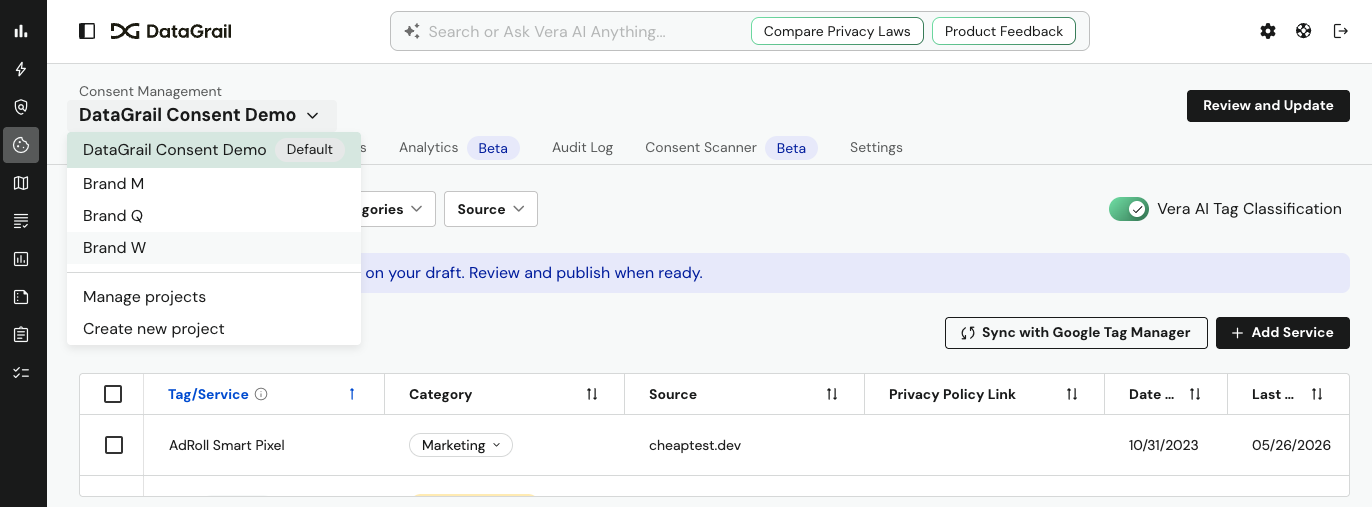
Switching Between Projects
The project switcher appears at the top of the Consent platform, just below the Consent Management heading. It displays the name of the currently active project.
To switch projects, click the project name to open the dropdown. All projects associated with your account are listed. Select any project to load its configuration across all tabs — Tracking Services, Cookies, Layouts, Analytics, Audit Log, Consent Scanner, and Settings.
The URL updates to reflect the active project, so you can bookmark or share direct links to a specific project view.
Managing Projects
To view and manage all projects, select Manage Projects towards the bottom of the project switcher dropdown. This opens a Manage Project drawer on the right side of the screen, showing each project as a card with its name, created date, and last publish date.
From the Manage Project panel you can:
- Create a new project using the Create Project button at the bottom of the panel
- Rename a project using the
...menu on any project card - Clone a project using the
...menu — see Cloning a project below - Delete a project using the
...menu — see Deleting a project below
The Default project is marked with a Default badge and cannot be deleted.
Creating a Project
- Open the project switcher dropdown and select Manage Projects, or + New Project directly from the dropdown.
- In the Create Project modal, enter a Project Name.
- Select Create.
The new project is added to your project list. It starts empty — no tracking services, layouts, or policies are carried over from other projects unless you use the clone option.
Cloning a Project
Cloning will copy an existing project's configuration into a new project, giving you a head start when setting up a similar brand or experience.
To clone a project:
- Open Manage projects from the project switcher dropdown.
- Click the
...menu on the project you want to clone. - Select Clone.
- Give the new project a name and confirm.
Deleting a Project
Non-default projects can be deleted from the Manage Project panel.
- Select the
...menu on the project card. - Select Delete.
- Confirm the deletion when prompted.
Deleting a Project is permanent and cannot be undone. The Default project cannot be deleted.
Project Configuration Scope
Each project maintains its own independent configuration for:
| Area | Isolated per Project |
|---|---|
| Tracking Services | Yes |
| Cookie rules and mappings | Yes |
| Banner Layouts | Yes |
| Privacy policies | Yes |
| Categories and locales | Yes |
| Allowed domains | Yes |
| Consent banner jobs and reports | Yes |
| Audit Log | Yes |
Publishing one project's container has no effect on any other project's live configuration.
Common Use Cases
- Multiple brands: Create a project for each brand with its own banner style, category structure, and privacy policy.
- Web vs. mobile: Maintain a separate project for your mobile experience with a different layout and cookie handling configuration, deployed to your mobile container.
- Staging and testing: Use a separate project to test configuration changes before applying them to your production project.
Frequently Asked Questions
Below you'll find answers to common questions about setup, permissions, and how Projects interact with your existing configuration
Will my existing configuration be affected when I start using projects?
No. All existing configuration is automatically placed into your Default project. Nothing changes for your live consent experience.
Can I have different cookie categories in each project?
Yes. Categories, locales, and cookie rules are all fully isolated per project.
If I publish one project, does it affect others?
No. Each project publishes independently. Publishing Brand A's container has no impact on Brand B's live configuration.
Do existing API integrations need to be updated?
No. Existing API calls without a project_id parameter automatically resolve to your Default project. No changes are required for current integrations.
Who can create, clone, or delete projects?
Project management actions require admin-level consent permissions. Users with read-only access can view and switch between projects but cannot modify them.
Disclaimer: The information contained in this message does not constitute as legal advice. We would advise seeking professional counsel before acting on or interpreting any material.