Integrating Splash
Capabilities
DataGrail's Splash integration provides the following capabilities:
| Product | Capability | ||||
|---|---|---|---|---|---|
| Request Manager |
|
Before You Start
To successfully configure this integration, please ensure you have sufficient privileges:
- DataGrail User Role: Super Admin, Connections Manager
- Splash User Role: Admin
Get a Splash API Client ID and Client Secret
To authenticate with Splash, you will need a Client ID, Client Secret, Username, and Password.
- Get a Client ID and Client Secret by contacting your Splash Customer Success Manager and store the values in a temporary, secure location.
- The Username and Password are what you use to log in to Splash.
Create a Deletion Webhook
Splash supports anonymizing customer’s data with email. This functionality is not provided out-of-the-box in Splash, but if you want to use this functionality with DataGrail, use the following instructions:
- Log in to Splash, and nagivate to Integration, then New Integration
- Choose Incoming Webhook type.
- Configure new Webhook Integration.
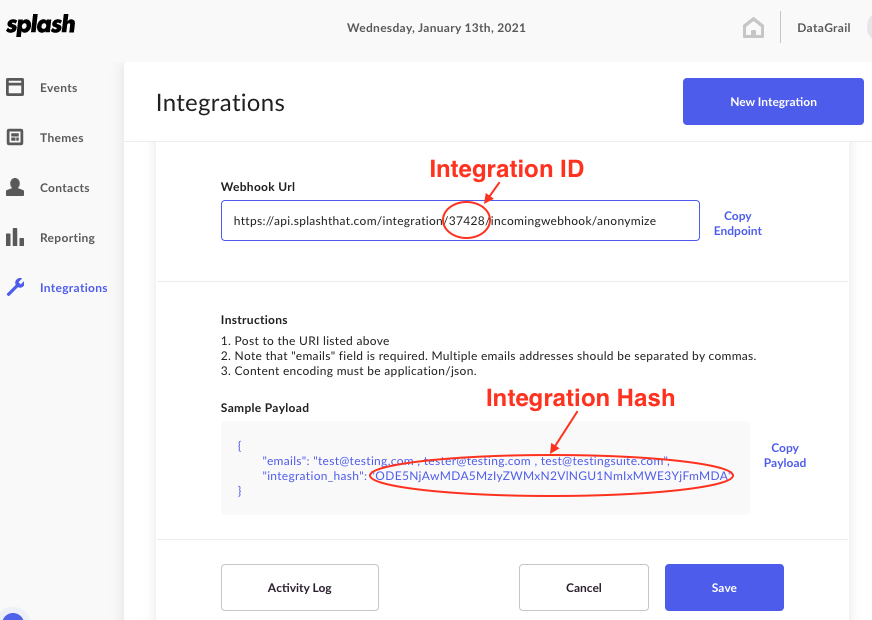
Webook Configuration
- Enable the webhook integration by selecting the Incoming Webhook toggle.
- Enter an Integration Name such as "DataGrail".
- Select Anonymize in the Webhook Action dropdown.
- Select Save.
- Copy the Integration ID and Integration Hash from the webhook page and store them in a secure, temporary location.
Connect to DataGrail
- In DataGrail, navigate to Integrations and select Configure New Integration to search for Splash.
- Enter the Client ID, Client Secret, Username, and Password .
- Enter the Webhook Integration ID and Webhook Integration Hash . (please note that these fields are optional and won't affect your connection in case you do not want to support deletion).
- Select Configure Integration.
Next Steps
Now that you've successfully connected the integration, check out the following resources:
Troubleshooting
If you are unable to successfully connect the integration, review these common troubleshooting steps:
Ensure Required Permissions Are Granted on API Keys/Resources
DataGrail checks required permissions and scopes on API keys/resources used by each integration. If all necessary permissions are not granted, new connections will fail.
Review Required Account Types and User Roles
If users do not have the necessary permissions or the minimum required user role in the connecting system, the connection to DataGrail will fail. Additionally, connections will fail if your account type does not match the one required by the integration.
See Before You Start to review these requirements.
Technical Details
The Splash integration uses the Contacts API:| Access Type | Synchronous |
|---|---|
| Deletion Type | Synchronous |
API Documentation
Learn more about this API implementation and DataGrail functionality in our API Integration Documentation.
Disclaimer: The information contained in this message does not constitute as legal advice. We would advise seeking professional counsel before acting on or interpreting any material.