Discovered Integrations
DataGrail automatically identifies systems in your Live Data Map that have supported integration capabilities and surfaces them on the Discovered tab of the Integrations page. This helps you quickly identify and configure integrations to build a fully autonomous DSR fulfillment process.
Discovered Tab
The Discovered tab provides a snapshot of systems currently detected in your Live Data Map that support integration capabilities such as DSR management or Data Discovery.
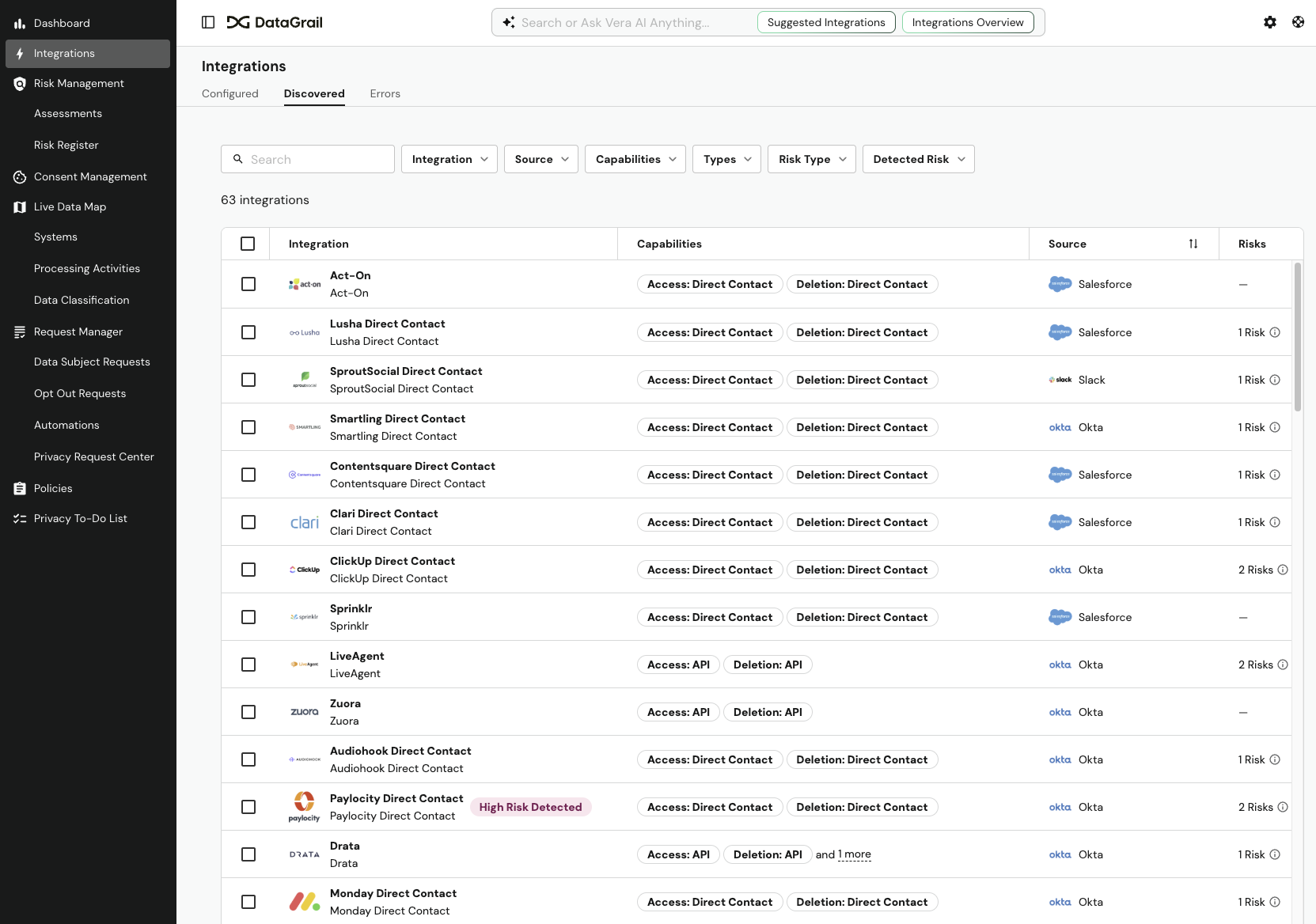
The table displays the following information about each discovered integration:
| Column | Description |
|---|---|
| Integration | The name of the system with corresponding integration capabilities |
| Capabilities | Available integration capabilities for that system (e.g. Access, Deletion, Data Discovery, System Detection) |
| Source | How the system was detected (e.g., via Okta or Slack) |
| Risks | The number of risks associated with the integration. Integrations with a High Risk Detected label indicate elevated risk that warrants immediate attention. |
| Date Discovered | The date the system first appeared in your Live Data Map |
Filters
You can narrow the list of discovered integrations using the filter bar at the top of the table. The following filters are available:
| Filter | Description |
|---|---|
| Integration | Search for a specific integration by name |
| Source | Filter by the system that detected the integration (e.g., Okta, Slack, Salesforce) |
| Capabilities | Filter by available capabilities (e.g., Access, Deletion) |
| Types | Filter by integration type |
| Risk Type | Filter by the type of risk associated with the integration |
| Detected Risk | Filter by risk detection status to surface high-risk integrations |
Configuring Integrations
You can quickly configure discovered integrations directly from this tab:
- Select the system you want to configure from the table.
- Follow the configuration steps to enable the integration.
Once an integration is enabled, it will appear on the System Profile within your Live Data Map.
Dismissing Integrations
If you do not wish to enable an integration for a specific system, you can dismiss it to remove it from the Discovered tab:
- Locate the system you want to dismiss from the table.
- Select Dismiss Integration.
The dismissed integration will no longer appear in your Discovered tab.
Disclaimer: The information contained in this message does not constitute as legal advice. We would advise seeking professional counsel before acting on or interpreting any material.