System Profiles
System Profiles allow you to document the use of a system within your organization, its inherent risk, and the Processing Activities it supports. DataGrail provides prefilled information for most third-party systems to make your data mapping efforts easy.
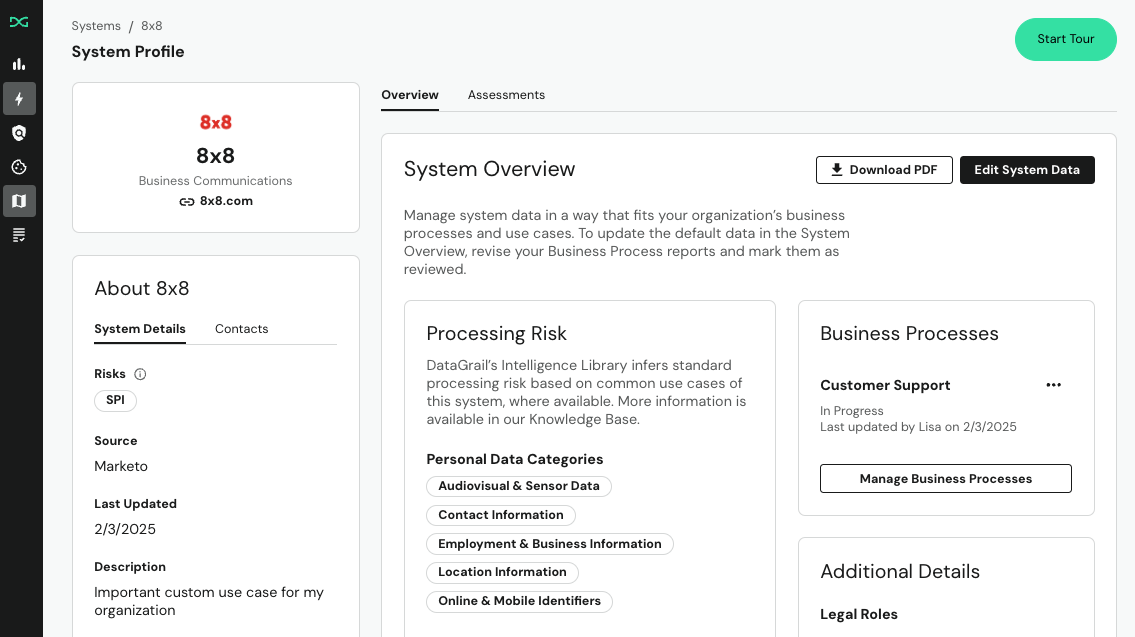
System Details
The System Details section offers a concise summary of key information about a system, helping you quickly understand its purpose, associated risks, and how it was added to your organization's System Inventory.
| Field | Description |
|---|---|
| Risks | This column surfaces specific risk criteria based on standard use cases of a system. This list is continuously updated to help you surface risk across your system inventory. |
| Last Updated | When a System Profile page was last edited. |
| Description | When available, DataGrail will include a description of the system to help you quickly get acquainted with what processing activities are commonly associated with the system. You can override the existing text with custom descriptions that capture your organization's unique use case of that system. |
| Source | The way in which this system was added into your Inventory. |
| Resources | When available, DataGrail will include links to the system's privacy policy or subprocessor URL. The subprocessor URL is how we source "AI subprocessors," which is one of the criteria used to flag "AI Detected" risk. |
| Notes | Any additional customer-provided context or resources relating to the system. |
Contacts
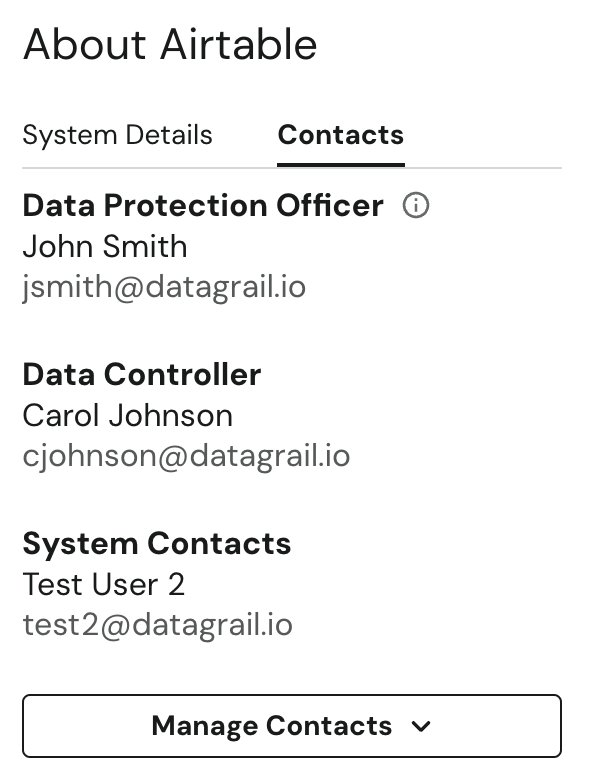
The Contacts Section in the left-hand sidebar of a System Profile page allows you to define and track relevant contacts associated with a given system or your overall privacy program.
- Data Protection Officer or Data Controller: The DPO and the Data Controller will be included in the Contacts section for each system by default. These individuals are defined within your DataGrail Settings.
- System Contacts: System Contacts are defined at the system level and allow you to define distinct owners for different systems in your inventory.
Adding System Contacts
System Contacts are added at the individual system level from the system's profile page.
- Open a system's profile page from the System Inventory.
- Select Manage Contacts in the Contacts section of the left-hand sidebar.
- Select Create and Add Contact to open the contact window.
- Fill in the contact's First Name, Last Name, Title, Email Address, and Phone Number. Title is optional — if left blank, it is not shown on the profile.
- Select Create and Add Contact to save.
Each contact appears on the profile in this order: name, title (if set), email.
Adding Reporting Contacts
Data Protection Officers, Representatives, or Data Controllers defined for all systems in your inventory are managed in the Settings page:
- Navigate to Settings in the DataGrail sidebar.
- Select the Reporting Contacts section.
- Use Add Contact to add default contacts for your systems.
If you do not have a designated DPO, we recommend adding the contact details of your Privacy Team.
System Overview
The System Overview is your central hub to document how a system is used within your organization. DataGrail Instant Risk Categories pre-populate system metadata based on the most common use cases of that system. This helps you understand which systems are more likely to have privacy risk based on the personal data they process and associated use cases.
The System Overview Section can be populated from two places:
- DataGrail's Pre-filled Metadata: DataGrail's Intelligence Library has pre-populated processing risk information based on common use cases of a known system.
- Editing System Data: Editing the System Data directly allows you to document how a system is used at the system-level.
Intelligence Library
DataGrail's Intelligence Library is a frequently updated, curated dataset of system risk metadata. When a system is added to your inventory, the Intelligence Library automatically populates its System Overview with processing risk information based on known use cases and publicly available resources.
The Intelligence Library follows a risk-presumptive approach — it surfaces every potential risk associated with a system rather than risk missing one. This gives you full visibility into what a system could process, with the ability to remove any categories that don't apply to your organization's specific use of that system by selecting Edit System Data.
Example: Location Data as a personal data category
A system may show Location Data as a pre-filled personal data category. This can mean the system collects IP addresses, tracks geographic regions for analytics, or stores physical addresses. If this category doesn't apply to how your organization uses the system, you can remove it by selecting Edit System Data.
Intelligence Library data is populated when a system is first added to your inventory. Updates to the Intelligence Library do not retroactively modify existing systems. If you have manually edited a system's data, your entries always take precedence over pre-filled values.
Editing System Data
A System Data Report is a live document — there's no separate edit mode and no save button. Select Edit System Data in the top right of the System Overview page to open the report, then select into any field to update it directly. Your changes save automatically as you type.
- Select Edit System Data in the top right of the page.
- Populate the relevant Categories.
- (Optional) Add stakeholders in other parts of the organization by selecting Add External Contributors. They will instantly receive an email notification with a link to an editable version of the report.
- Select Resend Invite to send a new email link to the recipient, as invite links expire after 7 days.
- Select Remove External Contributor to mark the contributor as "removed".
DataGrail periodically saves a snapshot of the report as you and your contributors work, so you can always review how it has changed over time. Select the Change History tab to see previous snapshots.
To have Vera recommend field values from your uploaded documents, select Analyze with Vera on the system's Attachments tab. See System and Processing Activity Analysis for details.
System Data Reports no longer require a Mark as Reviewed action to save changes — every update is saved automatically, and there's no locked "reviewed" state that blocks further edits.
Field Configuration
Admins can manage the customer-wide labels and selectable options used in System Profile and RoPA fields from Settings > Field Configuration. These settings apply across Live Data Map and Risk Manager.
The Aliases tab lets admins rename preset fields, options, and sub-options. The default taxonomy value stays visible in the table, while the alias is the label users see when completing supported System Profile and RoPA fields.
The Custom Options tab lets admins add selectable options under an existing field or option. For example, an admin can add a new Data Subject under Data Subjects, or a new sub-option under Personal Data Categories > Contact Information. Custom options are available in System Profile and RoPA forms as soon as they're saved.
The Custom Options tab is available on Growth and Enterprise plans. Contact your account manager for details.
Deleting a custom option removes it from forms going forward. Previously saved snapshots keep the labels and selections that were present when they were captured.
Customizing the Template
Admins can customize the structure of the System Data Report by editing its shared template. The template defines which questions appear on every system's report — a question you add to it appears on every system immediately, and a question you remove disappears from every system's report, along with any answers already recorded for it.
- Open a system's profile page and select Edit System Data to open its report.
- Select Edit Template at the bottom of the report.
Editing the template updates every system in your inventory, not just the one you opened it from.
The template has two sections.
| Section | Description |
|---|---|
| Standard Fields | The default categories available on every System Data Report. These fields are locked — you can't edit their question text, answer options, or order. |
| Custom Questions | Questions you add yourself. Select + Add Question to get started. |
Custom questions use the same question builder available for Risk Assessment templates. Choose from the basic answer types and write your own answer options. Conditional questions and pre-filled answer types aren't available for System Data Reports.
Only users with the Admin role see Edit Template. If you're an admin and don't see it, contact your account manager.
Categories
The following categories are available within the System Overview and Processing Activity reports to document the use of particular system in your organization.
Personal Data Categories
Personal Data, also called personal information or PII, is information relating to an identified or identifiable natural person.
If a system has any of the below categories, we will also show that the system contains Sensitive Personal Information within the report. The following table lists each Sensitive Personal Information category by its category group:
Sensitive Personal Information (SPI) Categories
| Category Group | Sensitive Categories |
|---|---|
| Government Identification | All categories: Driver’s License or Other State ID, Taxpayer Identification Number (TIN), Immigration or Naturalization Number, Other Government Identifier, Passport Number, National Insurance Number, Social Security Number (SSN) |
| Biometric Data | All categories: Fingerprint, Facial Patterns, Iris Patterns, Voice Patterns, Handwriting |
| Genetic Data | All categories: DNA, Family Genomics, Ethnographics |
| Health & Medical Data | All categories: Fitness, Diet and Wellness, Heart Rate, Condition, Treatment, Medical History, Medical Record Number, Insurance, Claims and Billing Information, Prescription Information |
| Demographics & Psychographics | Birthplace or Hometown, Citizenship or Naturalization, Immigration Status, Nationality, Political Opinions or Affiliation, Racial or Ethnic Origin, Religious or Philosophical Beliefs, Sex Life or Sexual Orientation, Trade Union Membership |
| Payment & Financial Information | Bank or Financial Account, Payment Information (credit, debit, pay service), Personal PIN or Access Code |
| Employment & Business Information | Criminal Convictions |
| Online & Mobile Data | Communication Contents (mail, email, messages, etc.) |
| Security & Diagnostics Data | Credentials (usernames with passwords) |
| Location Information | Precise Location (GPS, latitude/longitude, personal beacon, location over time) |
Personal Data Categories identified as Sensitive Personal Information (SPI) are highlighted in yellow and listed first, so you can quickly spot sensitive data in System Profiles, System Reports, and Processing Activities.
Data Subjects
A Data Subject is a natural person who can be identified, directly or indirectly, using various online and offline identifiers, characteristics or inferences. Specific legal definitions vary.
Available Data Subject Options
The following Data Subject options are available within DataGrail:
| Data Subject Type | Description |
|---|---|
| Customers | Individuals with whom you have a business transaction or user relationship in a Business-to-Business or a Business-to-Consumer context. |
| Children | Individuals under the age of 16. |
| Employees | Current or prospective employees, contractors or other hired representatives. |
| Job Applicants | A prospective employee undergoing a recruitment process. |
| Patients | A consumer of health, fitness, medical and prescription services. |
| Prospects | Prospective business or individual customers. |
| Vendors | Service providers, suppliers and business partners. |
| Website Visitors | Unique individuals visiting a page or multiple pages on a website. |
| Other | Custom categories directed by DataGrail Customers. For example, a "California household". |
Processing Purposes
Processing refers to any operation that is performed on personal data, such as collection, recording, storage, alteration, use, transmission, or erasure.
If data is collected for one reason but is used for another, this can raise privacy concerns. This is one of the reasons for regularly reviewing your privacy notices against your actual data uses. For example, if you intend to use collected data for order fulfillment only, but someone within your organization decides to sell this data to a marketing data company, order fulfillment is the primary purpose and data selling is the secondary purpose.
Available Processing Purposes
The following Processing Purposes are available within DataGrail:
| Processing Purpose | Description |
|---|---|
| Access Provisioning & Management | User account provisioning, management and de-provisioning. |
| Automated Decision Making | Machine-based decisions concerning individuals. |
| Backup & Archiving | Data stored to ensure its availability for recovery. |
| Benchmarking & Reporting | Measurements comparing the methods, performance and positions of an organization against internal or external standards. |
| Consent & Preference Management | Collecting and managing permissions and choices provided by individuals. |
| Content & Knowledge Management | Creating, curating and sharing information such as wikis, learning experiences, news, media, or social posts. |
| Correspondence | Communicating directly with individuals, including to respond to their inquiries and complaints. |
| Customer Relationship Management | Maintaining business relationships and databases. |
| Customer Support | Providing technical, administrative, operational or other kinds of support. |
| Data Storage & Access | Storing and accessing information on a storage system, browser or device. |
| Direct Marketing | Delivering audience-based or personalized marketing that may be based on an individual's demographics, preferences, interests or other characteristics. |
| Personalization | Improving or tailoring an individual's user experience or the content they receive or interact with. |
| Event Registration & Management | Hosting and administering in-person or virtual events. |
| Finance & Accounting | Record keeping related to financing, invoicing, payment collections and remittance, and related activities. |
| Fraud Prevention | Detecting and preventing fraudulent activity. |
| Human Resource Administration | Maintaining employee relationships, data, benefits and HR information systems. |
| Job Application Management | Talent acquisition and hiring process management. |
| Law Enforcement & National Security | Responding to lawful requests from law enforcement and other government agencies. |
| Legal Obligations & Compliance | Fulfilling legal obligations and protecting legal rights, terms, positions and claims. |
| Loyalty Program Administration | Administering program participation, rewards and redemptions. |
| Measurement & Analytics | Measuring the performance and effectiveness of content, products, service and promotions. |
| Payment Processing | Sending, receiving and processing payments. |
| Profiling | Aggregating and analyzing an individual's preferences, characteristics, psychological trends, predispositions, behavior, attitudes, intelligence, abilities, and aptitudes. |
| Research | Archiving or analytics for scientific, historic or statistical purposes. |
| Sales & Demand Generation | Business lead and demand generation, outreach and related record keeping. |
| Security Management | Ensuring the security, confidentiality and availability of system and data. |
| Selling & Monetizing Data | Transferring or exchanging data for monetary or other valuable considerations. |
| Service Delivery & Fulfillment | Delivering products or services in accordance with contractual agreements and terms of service. |
| Service Management & Improvement | Managing or improving the performance and value of systems, products or services. |
| Targeted Advertising | Serving advertising tailored to an individual's preferences, characteristics, psychological trends, predispositions, behavior, attitudes, intelligence, abilities, and aptitudes. |
| Tracking | Monitoring the behaviors, interactions and movements of an individual. |
| Other | Custom purposes directed by DataGrail Customers. |
Legal Roles
The legal relationship between your company and the given system.
Legal Basis
Modern privacy and data protection laws require that you identify valid grounds for processing personal data. To be lawful, processing must meet the criteria (usually itemized) set out under the law. These are considered legal bases or lawful grounds for processing and will depend on your specific purposes and the context of processing. We recommend considering why you want to process the data, and apply which legal basis best fits the circumstances.
European Union & UK
The lawful grounds for processing personal data as itemized under the EU GDPR and UK GDPR.
| Legal Basis | Description |
|---|---|
| Contract | Where the processing is necessary for a contract you have with the individual, or because they have asked you to take specific steps before entering into a contract. |
| Legal Obligation | Where the processing is necessary to comply with the law, including a lawful request from a court or another public authority (not including contractual obligations). |
| Vital Interests | Where the processing is necessary to ensure the life or safety of the individual. |
| Public Interest | Where the processing is necessary to fulfill an official task or is for the public good. |
| Legitimate Interests | Where the processing is necessary to fulfill reasonable business / commercial interests and these interests are not overridden by the privacy rights and freedoms. (This cannot apply if you are a public authority processing data to perform your official tasks.) |
| Consent | Where the individual has freely given their specific, informed and unambiguous consent for a specific purpose or closely related set of purposes. |
US & California
The lawful grounds for processing personal data as itemized under the EU GDPR and UK GDPR.
| Legal Basis | Description |
|---|---|
| Business Purpose | Where the processing of personal information is for one or more of the business’s or a service provider’s reasonable operational purposes, or other notified purposes. |
| Auditing Interactions with Consumers | Auditing related to counting ad impressions to unique visitors, verifying positioning and quality of ad impressions, and auditing compliance with this specification and other standards. |
| Security | Helping to ensure security and integrity to the extent the use of the consumer’s personal information is reasonably necessary and proportionate for these purposes. |
| Debugging/Repair | Debugging to identify and repair errors that impair existing intended functionality. |
| Certain Short-term Uses | Short-term, transient use, including, but not limited to, nonpersonalized advertising shown as part of a consumer’s current interaction with the business, provided that the consumer’s personal information is not disclosed to another third party and is not used to build a profile about the consumer or otherwise alter the consumer’s experience outside the current interaction with the business. |
| Performing Services | Performing services on behalf of the business, including maintaining or servicing accounts, providing customer service, processing or fulfilling orders and transactions, verifying customer information, processing payments, providing financing, providing analytic services, providing storage, or providing similar services on behalf of the business |
| Internal Research for Tech Development | Undertaking internal research for technological development and demonstration. |
| Quality and Safety Maintenance and Verification | Undertaking activities to verify or maintain the quality or safety of a service or device that is owned, manufactured, manufactured for, or controlled by the business, and to improve, upgrade, or enhance the service or device that is owned, manufactured, manufactured for, or controlled by the business. |
| Commercial Purpose | Where the processing of personal data is for a commercial or economic interest, such as by inducing another person to buy, rent, lease, join, subscribe to, provide, or exchange products, goods, property, information, or services, or enabling or effecting, directly or indirectly, a commercial transaction. |
| Consent | Where the individual has freely given their specific, informed and unambiguous consent for a specific purpose or closely related set of purposes.Consent means any freely given, specific, informed, and unambiguous indication of the consumer’s wishes by which the consumer, or the consumer’s legal guardian, a person who has power of attorney, or a person acting as a conservator for the consumer, including by a statement or by a clear affirmative action, signifies agreement to the processing of personal information relating to the consumer for a narrowly defined particular purpose. |
Processing Countries
The locations where personal data is being processed or stored.
Personal Data Origins
Personal data origins refers to how the personal data was originally collected for the system named in the report.
Data Distribution
Data distribution refers to personal data transferred from the system name in the report to other systems in your inventory.
Data Subject Consent Origins
Where consent is the legal basis the methods by which valid consent is obtained. Consent refers to any freely given, specific, informed and unambiguous indication of the data subject's agreement to the processing of their personal data.
Protective Measures
Protective measures refer to any steps taken to safeguard data.
Assessments
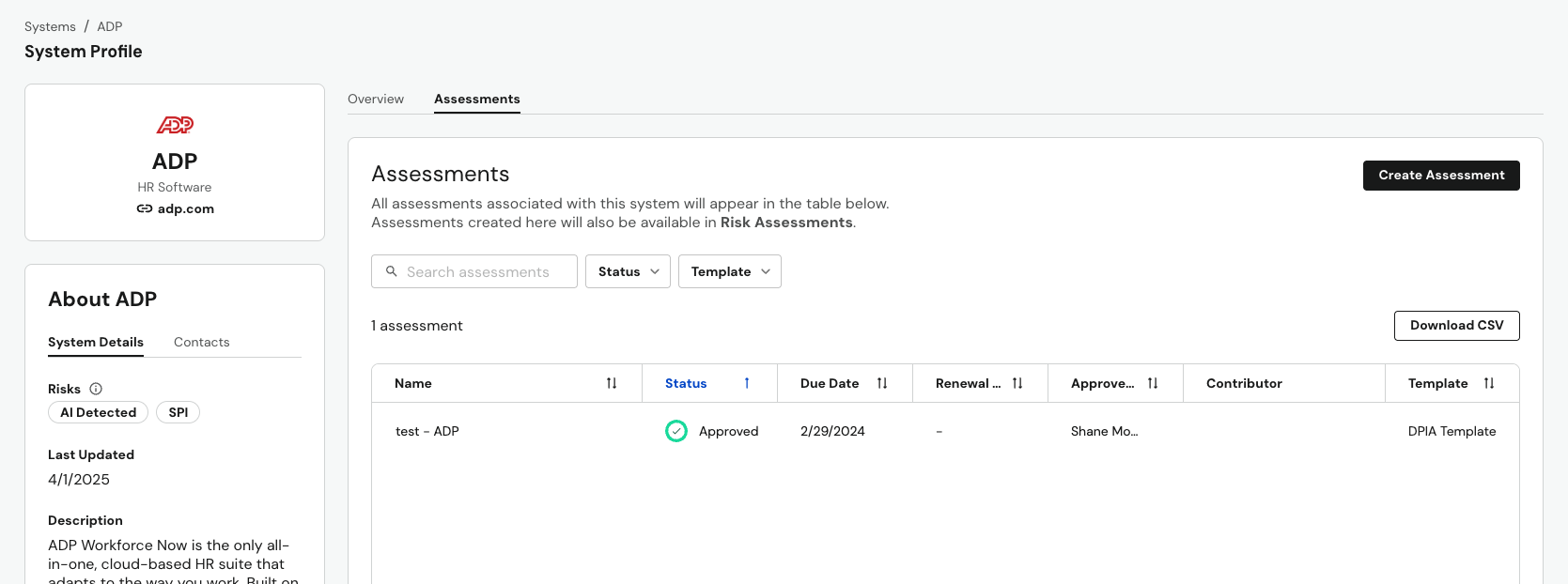
Risk Assessments associated with a given system will be linked in the Assessments tab in addition to being available within the Risk Assessments section of the DataGrail app.
Change History
The Change History panel provides a complete audit trail of every modification made to a system's System Data Report, including who made each change and when. To open it, select View Change History in the top right of the System Profile page.
The following types of changes are tracked:
| Category | Events |
|---|---|
| Questions | Answer added, edited, or cleared |
| Template | A custom question was added to or removed from the shared template |
| Contributors | Contributor added, removed, or name changed |
| Documents | Document uploaded or deleted |
| AI Suggestions | Suggestion generated or accepted |
| Status Changes | Report status transitions |
| Metadata | Name, due date, or additional context changed |
| Risks | Risk linked or unlinked via a Risk Assessment |
| Integrations | Integration connected to the system |
| Contacts | System contact added or removed |
Each entry displays the actor's name (or "API Submission" for programmatic changes), the action taken, and a timestamp. Recent activity (within 24 hours) shows relative times like "2 hours ago," while older entries display the full date and time.
Select any entry to expand it and view details such as before/after values for edits, affected question numbers, or document filenames.
Use the Filter dropdown to narrow the history by category (Questions, Contributors, Documents, etc.). Select Export CSV to download the filtered history — useful for audit documentation or sharing activity summaries with stakeholders.
Disclaimer: The information contained in this message does not constitute as legal advice. We would advise seeking professional counsel before acting on or interpreting any material.