Audit Log & Reporting
DataGrail maintains a full audit trail for every DROP deletion request processed on your behalf. DROP requests are also visible in the Request Manager queue, where your team can track processing status alongside all other privacy requests. This article covers what is recorded in the audit log, how to access it, how to export data for compliance reporting, and how to monitor your 45-day SLA compliance.
What is Recorded
For every DROP deletion request, DataGrail records the following:
| Field | Description |
|---|---|
| Request ID | DataGrail's internal tracking ID for the deletion request |
| DROP Session ID | The DROP registry session/cycle the request originated from |
| Broker ID | Your CalPrivacy data broker registration number |
| Hash Type | The identifier list type that produced the match (email, phone, ndz, name_vin, maid, ctvid) |
| Match Outcome | Whether the request resulted in a confirmed match, no match, or uncertain match |
| Remote Identifier | Your consumer pointer — the value you sent during ingestion |
| Ingestion Timestamp | When DataGrail received the request from the DROP registry |
| Match Timestamp | When the identity matching step completed |
| Dispatch Timestamp | When DataGrail dispatched the deletion to your system |
| Completion Timestamp | When your system confirmed deletion via callback |
| Registry Confirmation Timestamp | When DataGrail reported the outcome back to the DROP registry |
| Final Status | deleted, not_found, opted_out, revoked, or failed |
revoked means the consumer withdrew their deletion request directly with CalPrivacy — it's not an outcome your systems report. DataGrail applies it automatically when the DROP registry indicates a request has been withdrawn.
Accessing the Audit Log
- Navigate to Data Broker Compliance in the left sidebar.
- Select the DROP Status tab.
- Use the date range filter to scope the view to a specific period.
- Select any request row to view the full lifecycle detail for that request.
You can filter the audit log by:
- Date range — scope to a specific DROP session or time window
- Status — filter by
deleted,not_found,opted_out,revoked, orfailed - Hash type — filter by identifier list type
- Match outcome — filter by confirmed match, no match, or uncertain match
DROP Records
The DROP Records tab lists every individual record DataGrail is tracking for your broker registration, so you can look up a specific consumer identifier and see where it is in the deletion lifecycle. Each row represents one record imported from a CalPrivacy identifier list.
| Column | Description |
|---|---|
| Hash Value | The hashed consumer identifier (a SHA-256 blind index) that CalPrivacy provided for the record. |
| List Type | The identifier list the record came from: NDZ, Email, Phone, MAID, Name + VIN, or CTV ID. |
| Lifecycle Status | The rolled-up processing state of the record (see values below). |
| CalPrivacy Status | Whether the record's outcome has been reported to the CalPrivacy DROP registry (see values below). |
| External ID | The consumer pointer you sent during ingestion. Shows — when none was provided. |
The consumer email, when available. Shows — when none was provided. |
Lifecycle Status Values
The Lifecycle Status column reflects where a record is in the deletion process. Final states describe the processing outcome only — whether that outcome has been reported to CalPrivacy is tracked separately in the CalPrivacy Status column.
| Status | Meaning |
|---|---|
| Pre-scan | The record has been imported, but identity matching hasn't decided an outcome yet. |
| Deleting | At least one deletion is in progress for the record, and none has reached a final state. |
| Opting Out | At least one opt-out is in progress for the record. |
| Deleted | The record reached a final state — it was deleted from your systems. |
| Opted Out | The record reached a final state — the consumer was opted out. |
| Exempt | The record reached a final state — it was exempted from deletion. |
| Not Found | The record reached a final state — it was compared against your systems and matched nothing. |
| Revoked | The consumer withdrew the request directly through CalPrivacy. |
CalPrivacy Status Values
The CalPrivacy Status column shows whether a record's outcome has been uploaded to the CalPrivacy DROP registry:
| Status | Meaning |
|---|---|
| Uploaded | The record's outcome has been sent to the CalPrivacy DROP registry. Hover over the status to see the upload date. |
| Not uploaded | The record's outcome has not yet been reported to the registry. |
An Uploaded status reflects that DataGrail sent the record's outcome to the CalPrivacy registry — it does not indicate that the registry has confirmed receipt.
Monitoring 45-Day SLA Compliance
The audit log includes a Days to Completion column that shows how long each request took from ingestion to registry confirmation. DataGrail will surface any requests approaching or exceeding the 45-day SLA with a warning indicator.
Requests that have not reached a final status within 40 days will be flagged in the audit log. Investigate and resolve these immediately to avoid the $200 per request, per day penalty that applies after the 45-day window.
To view at-risk requests:
- Navigate to Data Broker Compliance > DROP Status.
- Select the At Risk filter to surface requests within 5 days of the 45-day deadline.
- Review each flagged request and resolve any outstanding deletion callbacks.
Exporting Audit Data
DataGrail supports exporting audit log data as gzip-compressed TSV files to a cloud storage bucket you own for use in compliance reporting, SIEM integration, or internal audit processes.
- Navigate to Data Broker Compliance > DROP Status.
- Select Export.
- Choose your date range.
- Select Download to export directly, or configure a cloud storage destination under Settings for automated daily exports.
For ongoing compliance reporting, configure a cloud storage destination in DataGrail to receive automated daily audit log exports. This creates a durable, date-partitioned record of all DROP activity that can be ingested into your SIEM or reviewed during regulatory audits.
Exporting Suppression Lists
DataGrail can export a suppression list — the consumer identifiers whose DROP deletion requests have reached a final status — to a cloud storage bucket you own. Use this list to permanently exclude these consumers from future data collection, acquisition, or resale.
- Navigate to Data Broker Compliance > Settings.
- Under Suppression List Export Destination, select a Cloud Storage Integration and, optionally, a Folder.
- Select Save.
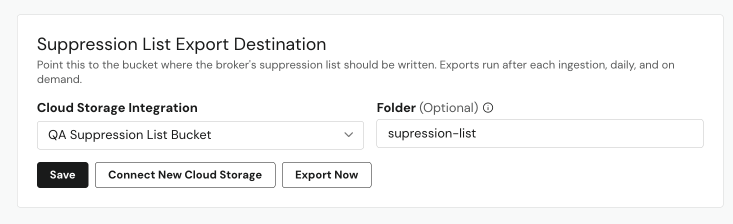
Suppression list exports run automatically after each ingestion and once daily. To generate an export immediately instead of waiting for the next scheduled run, select Export Now.
If you reuse the same cloud storage connection for your DSAR (privacy request) files, you must specify a dedicated Folder to isolate DROP data from DSAR data. If a shared connection has no folder configured, DataGrail refuses to write the export and records it as failed, rather than mixing DROP and DSAR data in the same location.
Only one suppression list export can run per broker registration at a time. Export Now is disabled while an export is in progress and relabels to Export In Progress…; it re-enables automatically once the export finishes.
Deletion Confirmation Records
Each completed deletion in the audit log serves as your record of compliance for that DROP request. In the event of a CPPA inquiry or audit, DataGrail's audit log provides:
- Timestamped evidence that the request was received within the monitoring window
- Confirmation that deletion was processed within the 45-day SLA
- The specific outcome reported back to the DROP registry
DataGrail retains audit log data for the duration of your partnership to support long-term compliance recordkeeping.
| Code | Meaning |
|---|---|
| 3 | Deleted |
| 4 | Opted out |
| 5 | Not found in your systems |
Disclaimer: The information contained in this message does not constitute as legal advice. We would advise seeking professional counsel before acting on or interpreting any material.