Hosted Storage & Mailer
Request Manager relies on two Foundation Connections: a Cloud Storage bucket for the data collected during Privacy Requests, and a Transactional Mailer for communicating with Data Subjects. To help you start processing Privacy Requests right away, DataGrail can host these for you on its own infrastructure—no AWS account or email setup required.
Hosted storage and hosted mailing are independent. You can use both, use either one on its own alongside your own provider for the other, or use neither and connect your own for both.
This page explains what DataGrail hosts on your behalf, how it is secured, and how to switch to your own infrastructure whenever you are ready.
What Is Hosted
DataGrail-hosted storage and mailing run on managed AWS infrastructure (Amazon S3 and Amazon SES) within DataGrail's own AWS account. The table below summarizes what is hosted and when:
| Foundation Connection | Availability | How to enable |
|---|---|---|
| Cloud Storage | Provisioned automatically for all new accounts | No action needed |
| Transactional Mailer | Optional | Let us know at account creation, or contact support@datagrail.io anytime |
DataGrail-hosted storage and mailing are optional. You can switch to your own cloud storage or transactional mailer at any time.
Hosted Cloud Storage
DataGrail-hosted Cloud Storage stores the data collected during a Privacy Request in a dedicated, isolated Amazon S3 bucket that DataGrail provisions and manages for you. It is enabled by default for all new accounts.
The following controls protect your data at rest and limit who can access it:
| Control | Detail |
|---|---|
| Encryption at rest | Data is encrypted at rest with AES-256, using a unique encryption key for each account |
| Isolation | Each account is assigned its own dedicated bucket, logically isolated from all other accounts |
| Access | Public access is fully blocked; only the DataGrail application can access the bucket through a scoped AWS role. There is no direct access for any person |
| Audit trail | Object versioning is enabled to support audit and recovery |
| Default region | us-west-2 (United States) |
DataGrail-hosted buckets apply an automatic retention lifecycle that deletes stored data after 121 days. This window is long enough to complete a Privacy Request while ensuring Data Subject data does not persist indefinitely.
Because hosted storage automatically deletes data after 121 days, download links for completed requests will stop working once the underlying files have been purged. See Resend Download Link for details.
Hosted Mailer
DataGrail-hosted mailing sends all email messages exchanged between DataGrail and a Data Subject throughout a Privacy Request—including identity verification, status updates, and completion notices. It runs on Amazon SES within DataGrail's AWS account and is optional—let us know at account creation, or contact support@datagrail.io to add it later.
When hosted mailing is enabled, DataGrail provisions a dedicated sending subdomain for your account and configures it for reliable, authenticated delivery:
| Detail | Value |
|---|---|
| Sender address | privacy@{your-subdomain}.mail.datagrail.io |
| Bounce handling | bounce.{your-subdomain}.mail.datagrail.io |
| Authentication | DKIM and SPF records configured automatically via DNS, with domain verification required before sending begins |
| Default region | us-west-2 (United States) |
DataGrail handles all DNS setup and verification on your behalf.
By default, the hosted mailer sends from privacy@{your-subdomain}.mail.datagrail.io. To send from your own domain instead, you can set up a custom sending domain (see below) while keeping DataGrail's hosted infrastructure, or switch to your own transactional mailer entirely.
If you'd prefer emails to come from your own domain (for example, mail.example.com) while still using DataGrail's hosted infrastructure, DataGrail can set up a custom sending domain for you.
Setting up a custom sending domain
To get started, contact support@datagrail.io with the domain you'd like to send from. Once we've set it up, a DNS Configuration section appears on your DataGrail Mailer integration on the Integrations page, listing a handful of DNS records to add. The sending domain can't be changed later—to use a different one, you'll need to delete the mailer and have a new one provisioned—so be sure it's the domain you want.
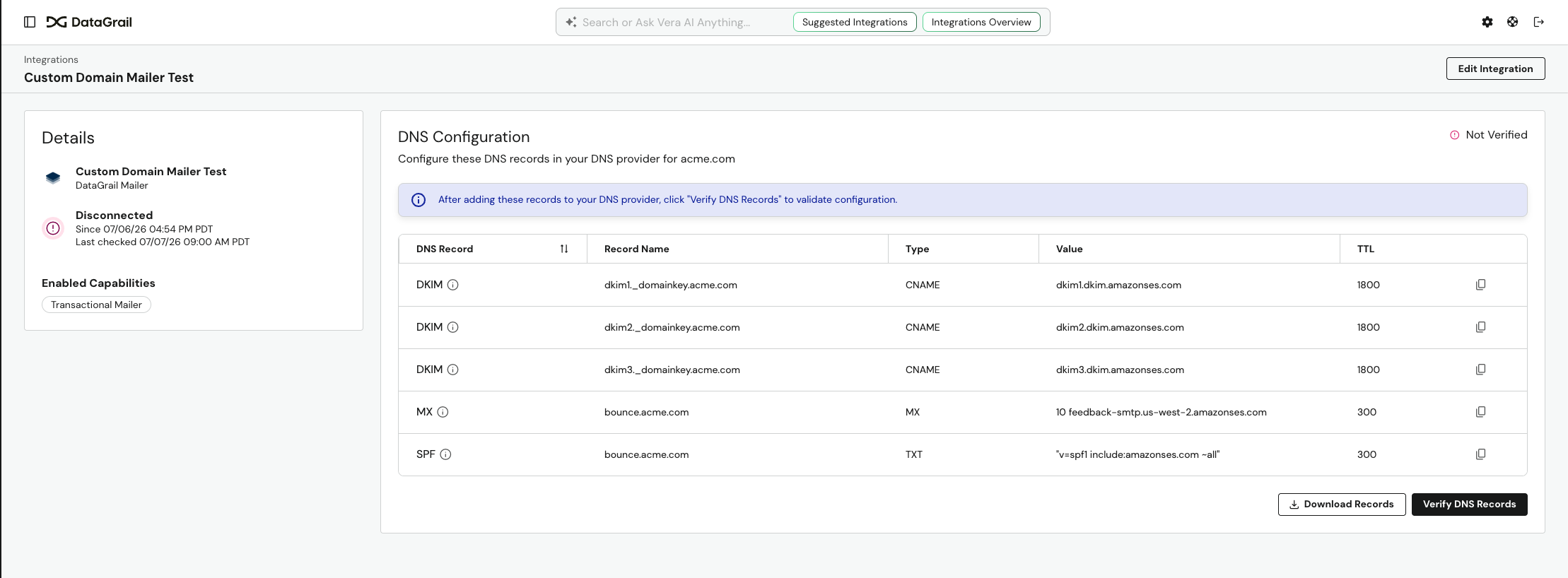
- Add each record shown to your DNS provider. You can copy records individually or select Download Records to export them all as a CSV.
- Return to the DNS Configuration section and select Verify DNS Records. Verification can take up to 10 minutes.
- When the status shows Connected, your domain is verified and emails will send from it automatically.
If verification doesn't succeed, double-check that each record matches what's shown, then select Retry Verification—there's no penalty for retrying.
Switching To Your Own
You can move from hosted storage or mailing to your own infrastructure at any time. This is the right choice if you have compliance requirements for dedicated infrastructure, need a custom sender domain, or already manage your own cloud environment.
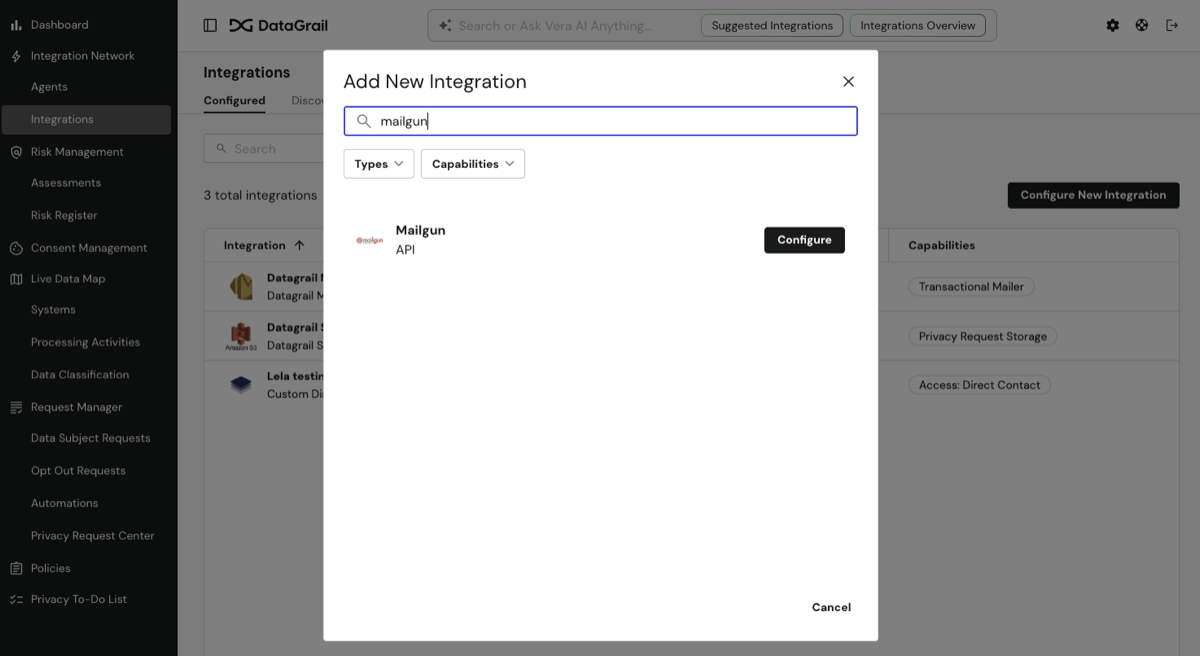
The process is self-serve through the Integrations page, with no downtime required:
- Navigate to the Integrations page.
- Select Configure New Integration.
- Search for and select your desired integration—one that has the Transactional Mailer or Privacy Request Storage capability.
- Check the appropriate capability (mailer or storage).
- Enter your credentials.
- Confirm that you want to switch to a self-hosted solution and connect.
The switchover is atomic—the moment your new integration connects successfully, all subsequent emails or uploads route to your own infrastructure. If the connection test fails, the hosted solution simply remains active, so there is a built-in rollback.
If you don't see the option to enable the Transactional Mailer or Privacy Request Storage capability, contact support@datagrail.io and we'll help you complete the switch.
Only one Cloud Storage connection and one Transactional Mailer can be active for your account at a time, so switching to your own replaces the hosted one going forward. Keep the following in mind:
What happens to data already in hosted storage?
New Privacy Request data is written to your own bucket as soon as the switch completes. Your DataGrail-hosted bucket becomes read-only—no new data is written to it—and the data already stored there is retained for a limited period before being permanently deleted. Be sure to retrieve any data you still need before that retention period ends.
What happens to in-progress requests when I switch mailers?
The switch takes effect immediately. New emails send through your own mailer, and any requests already in progress use the new mailer from that point forward. Your email send history remains available in the DataGrail platform, and no historical migration is needed.
Disclaimer: The information contained in this message does not constitute as legal advice. We would advise seeking professional counsel before acting on or interpreting any material.