Integration Status
DataGrail's Integrations power and automate processing of Privacy Requests against your organization's systems. There are four types of integrations within DataGrail:
- Synchronous API: This integration type facilitates automated data retrieval and deletion and processes almost instantly.
- Asynchronous API: This integration type facilitates automated data retrieval and deletion, but the third-party API does not respond to DataGrail immediately (Ex: Shopify takes up to 6 months, Klaviyo takes up to 14 days)
- Whole-Record Deletion API: This integration type facilitates automated data retrieval and deletion, but differs from Synchronous and Asynchronous API integrations because the third-party API is not capable of extracting data first on a deletion request.
- Direct Contact: This integration type uses an integrated email workflow that includes internal or external parties to process requests and can be connected for vendors without a workable API and/or for customers that prefer an alternate option to a fully automated approach.
There are two DataGrail workflow states in which your integrations will be run on a Privacy Request: Extracting Personal Data and Pending Delete. The workflow state and status of each integration is located in the top section of every Privacy Request.
To better understand when different integrations are run based on the type of Privacy Request, please reference Request Lifecycle by Privacy Right.
Extracting Personal Data
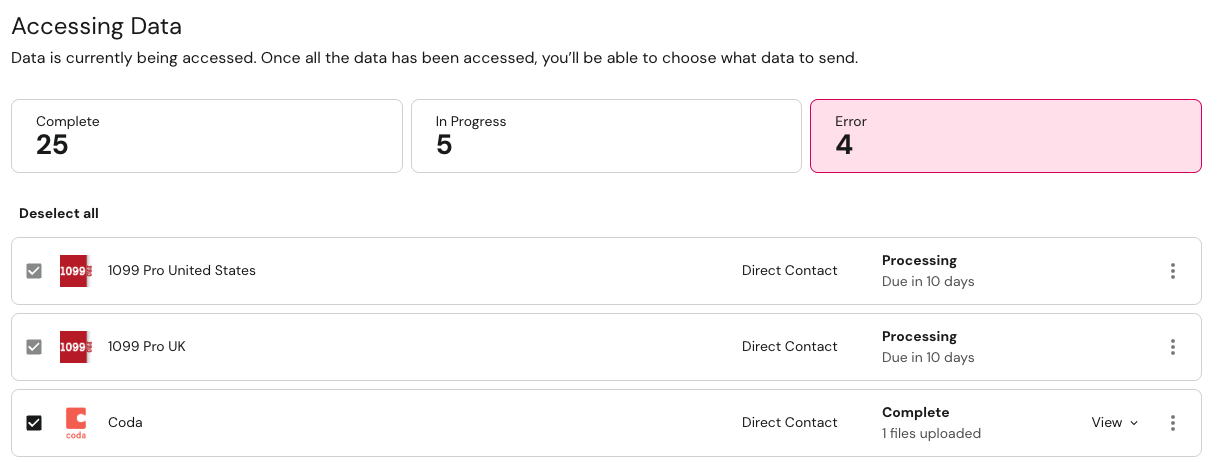
In the Extracting Personal Data state, integrations will query connected systems to identify if PII exists for the Data Subject. The table below shows all possible integration states for each integration type on a Privacy Request in the Extracting Personal Data state.
| Integration State | Integration Type | Description |
|---|---|---|
| Not Started | All | Integration has not yet begun processing. |
| Not Started Will process in a workflow | All | Integration is deferred to process in a workflow. |
| Pending | All | Integration is ready for processing and has been enqueued by DataGrail. Processing will begin automatically once DataGrail's queue clears. |
| Processing Request submitted | Synchronous API, Asynchronous API | API request successfully submitted. DataGrail waiting for API to complete request. |
| Processing Due in # days | Direct Contact | Direct Contact Email sent to the Processor. Awaiting their response. |
| Processing Due # days ago | Direct Contact | The Direct Contact Processor did not respond within 14 days and the integration is configured to block the request. |
| Error | All | Integration encountered an issue that could not be resolved programmatically. See Integration Errors. |
| Complete Access skipped | All |
|
| Complete Access skipped (no response) | Direct Contact | The Direct Contact Processor did not respond within 14 days and the integration is configured to skip. |
| Complete No records found | Synchronous API, Asynchronous API | Data retrieval completed and no records were returned. |
| Complete No files uploaded | Direct Contact | Direct Contact Processor has replied and indicated no records were found. |
| Complete Stopped processing | All | A user has manually stopped processing the integration in DataGrail. |
| Complete # records found | Synchronous API, Asynchronous API | Data retrieval completed and records were returned. |
| Complete # of files uploaded | Direct Contact | Direct Contact Processor has replied and uploaded data. |
Pending Delete
In the Pending Delete state, selected integrations will delete or anonymize PII associated with the Data Subject. The table below shows all possible integration states for each integration type on a Privacy Request in the Pending Delete state.
| Integration State | Integration Type | Description |
|---|---|---|
| Not Started | All | Integration has not yet begun processing. |
| Not Started Will process in a workflow | All | Integration is deferred to process in a workflow. |
| Pending | All | Integration is ready for processing and has been enqueued by DataGrail. Processing will begin automatically once DataGrail's queue clears. |
| Processing Request submitted | All API | API request successfully submitted. DataGrail waiting for API to complete request. |
| Processing Due in # days | Direct Contact | Direct Contact Email sent to the Processor. Awaiting their response. |
| Processing Due # days ago | Direct Contact | The Direct Contact Processor did not respond within 14 days and the integration is configured to block the request. |
| Error | All | Integration encountered an issue that could not be resolved programmatically. See Integration Errors. |
| Complete Deletion skipped | All |
|
| Complete Deletion skipped (no response) | Direct Contact | The Direct Contact Processor did not respond within 14 days and the integration is configured to skip. |
| Complete Nothing to delete | Direct Contact | The Direct Contact Processor responded with "No, we do not hold personal data about the data subject." |
| Complete No records deleted | Synchronous API, Asynchronous API | No data found in "Extracting Personal Data". Nothing to delete. |
| Complete Stopped processing | Direct Contact | A user has manually stopped processing the integration in DataGrail. |
| Complete Deletion done | Whole-Record Deletion API | Data has been successfully deleted. |
| Complete # records deleted | Synchronous API, Asynchronous API | All selected records have been deleted successfully. |
| Complete Deletion done | Direct Contact | The Direct Contact Processor responded with "Yes, we have deleted any applicable data belonging to the data subject." |
| Complete Data found, not deleted | Direct Contact | The Direct Contact Processor responded with "No, we could not delete data for the data subject." |
Integration Errors
When a privacy request encounters an integration error, you can view details about the error type, status code, and remediation steps.
For detailed information about different error types, status codes, and how to resolve them, visit Integration Errors.
Retrying Integrations
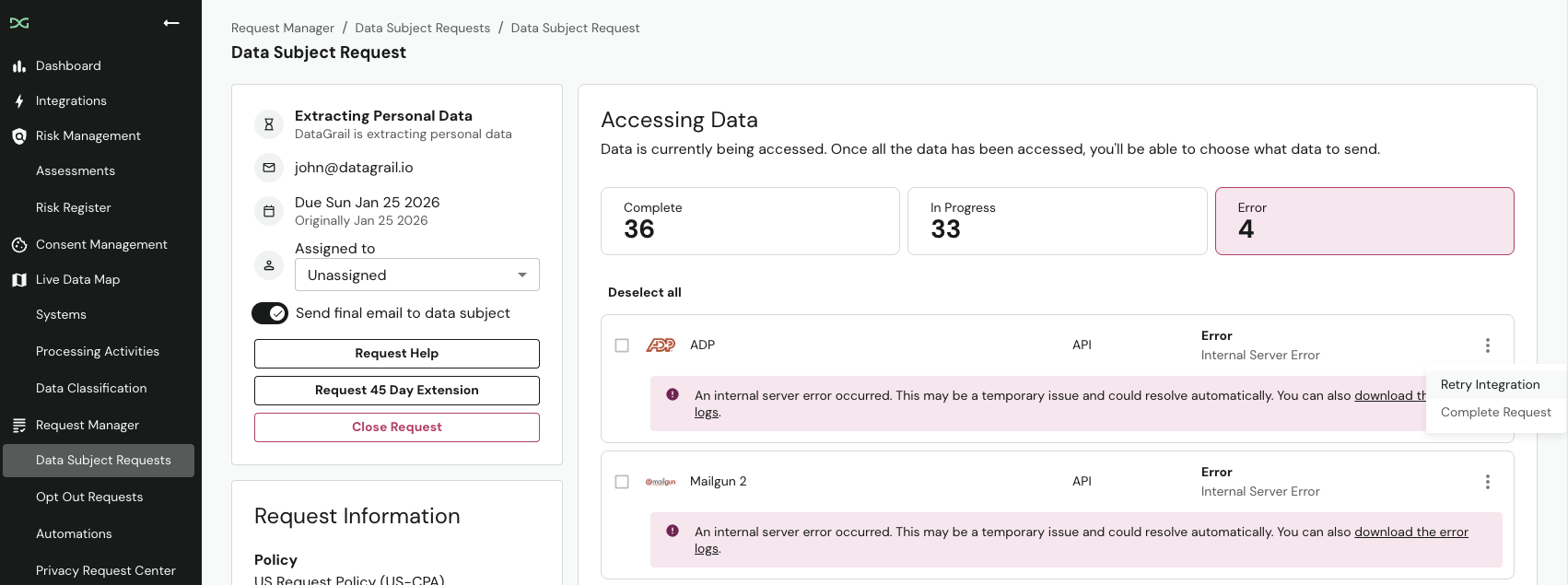
If an integration encounters an error, you can manually retry it without waiting for the automatic retry that occurs every 24 hours. This is useful when you've resolved the underlying issue (e.g. updating permissions) and want to immediately reprocess the request.
To retry a failed integration on a privacy request:
- Select the ellipses next to the failed integration.
- Select Retry Integration. It may take a few minutes for the retry to complete.
Skipping Integrations
If an integration can't complete (e.g. a connection needs updated credentials), you can skip it instead of waiting for it to retry.
Skipping an integration is permanent. It will not run for the remainder of the request, and it does not remove your obligation to fulfill the request. You are still responsible for completing the integration's work through another means and for keeping your own record of how it was handled.
To skip a single failing integration on a Privacy Request:
- Select the ellipses next to the failing integration.
- Select Skip Integration.
- Review the warning, confirm you understand it can't be undone, and select Confirm.
If the same integration is failing across many requests, you can skip it for all of them at once. See Skip Failing Integrations under Bulk Actions.
Disclaimer: The information contained in this message does not constitute as legal advice. We would advise seeking professional counsel before acting on or interpreting any material.