Capabilities
Vera powers several automated capabilities embedded throughout the DataGrail platform. These features surface insights, generate recommendations, and help you resolve issues faster.
Automated Cookie Classification
Vera can analyze your unmanaged cookies — those not yet categorized by a rule — and generate suggested cookie rules to accelerate your cookie management workflow.
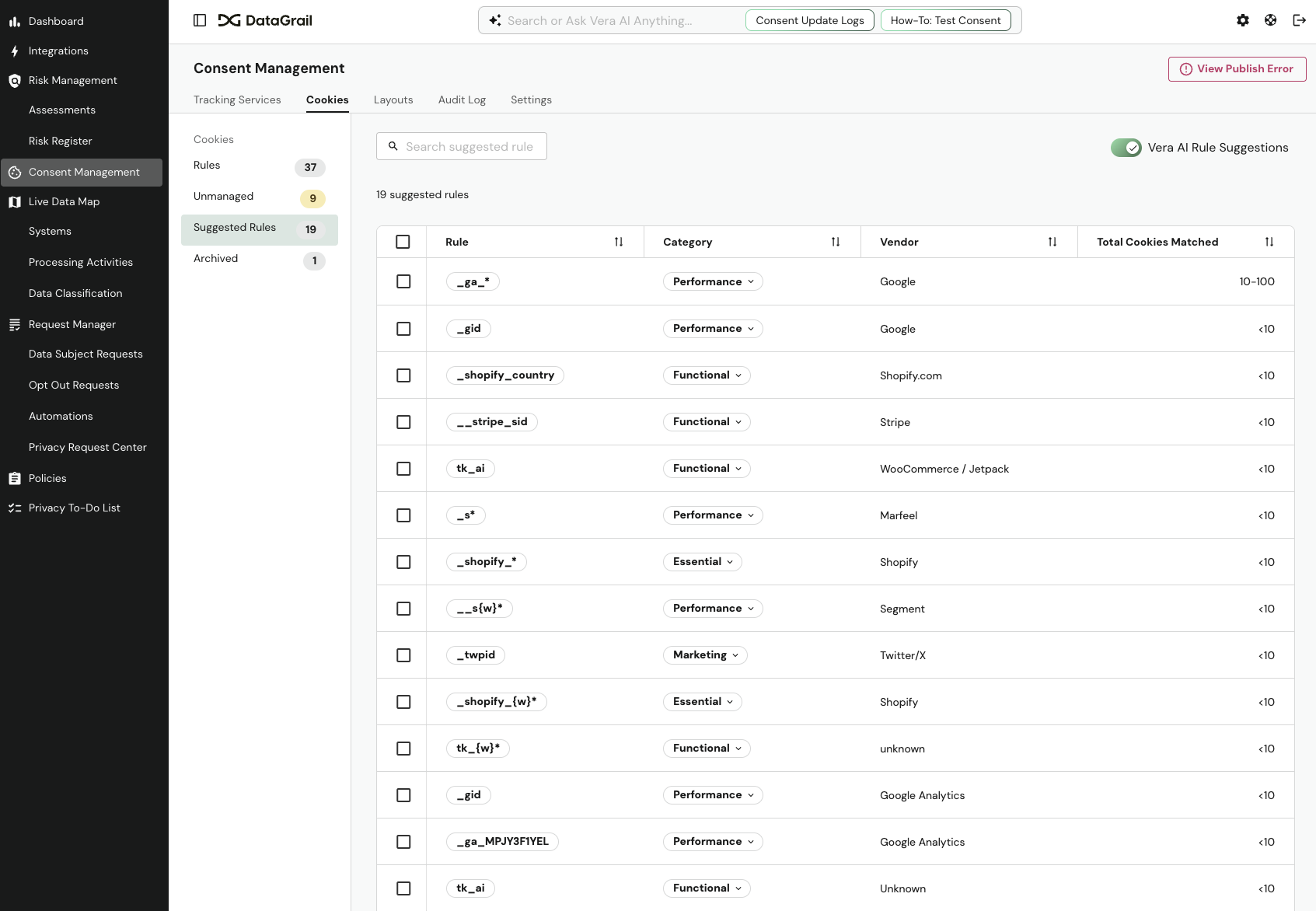
How it works: Vera's cookie classification operates in two layers:
| Layer | Description |
|---|---|
| Base rules | DataGrail maintains a house rule library that matches common cookie patterns using wildcarding (e.g., _ga* matches all Google Analytics cookies). These suggestions are always available. |
| AI-generated rules | When enabled, Vera analyzes remaining unmanaged cookies, groups them by common patterns, and uses AI to categorize them with appropriate consent categories, descriptions, vendors, and retention periods. |
Each AI-generated suggestion pre-fills the category, vendor, description, domain, and retention period. You review suggestions in the Suggested Rules tab and can accept them individually or in bulk.
Enabling Vera suggestions: Toggle Vera Rule Suggestions in the Suggested Rules tab. When enabled, DataGrail securely analyzes your unmanaged cookies to generate additional suggestions. It may take up to 1 hour for suggested rules to populate after enabling. You always review and approve suggestions before they are applied.
For full details on managing cookies, see Cookie Management.
AI Risk Detection
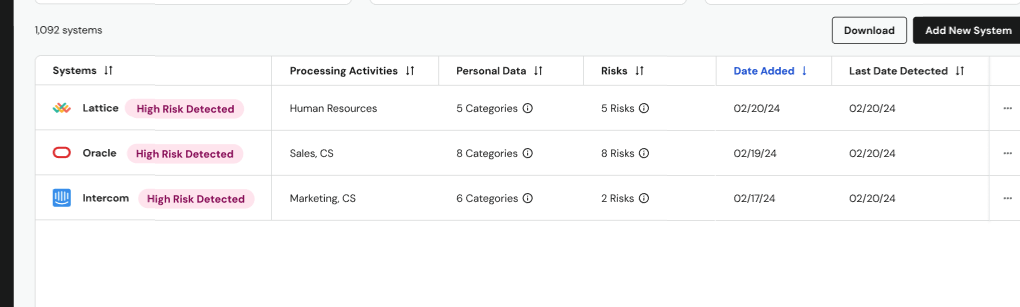
Vera continuously monitors your connected systems to identify potential privacy and compliance risks. It analyzes systems across three core factors:
- Sensitive personal data — What type of data is being processed or collected
- High-risk data subjects — Whose data the system likely collects (e.g., children, patients, employees)
- AI usage — How artificial intelligence is being used (e.g., automated decision making, generative AI, AI subprocessors)
Each detected risk is scored as high, medium, or low based on the severity of these factors. Vera pre-fills risk descriptions, overall risk levels, and suggested mitigation plans so you can quickly evaluate and promote findings into your Risk Register.
For a complete walkthrough of risk scoring, supported risk types, and management workflows, see AI-Detected Risks.
Suggested Processing Activities
Vera analyzes the systems in your inventory to understand their functions and recommends relevant processing activities, accelerating your Record of Processing Activities (RoPA) completion.

For example, after identifying Rippling as a workforce platform, Vera suggests activities like "Payroll Administration" and "Recruitment & Talent Acquisition." You review suggestions in the Suggested Processing Activities card, select the activities you want to add, and choose whether to add them with or without linked systems.
For the full workflow, see Suggested Processing Activities.
Assessment AutoFill
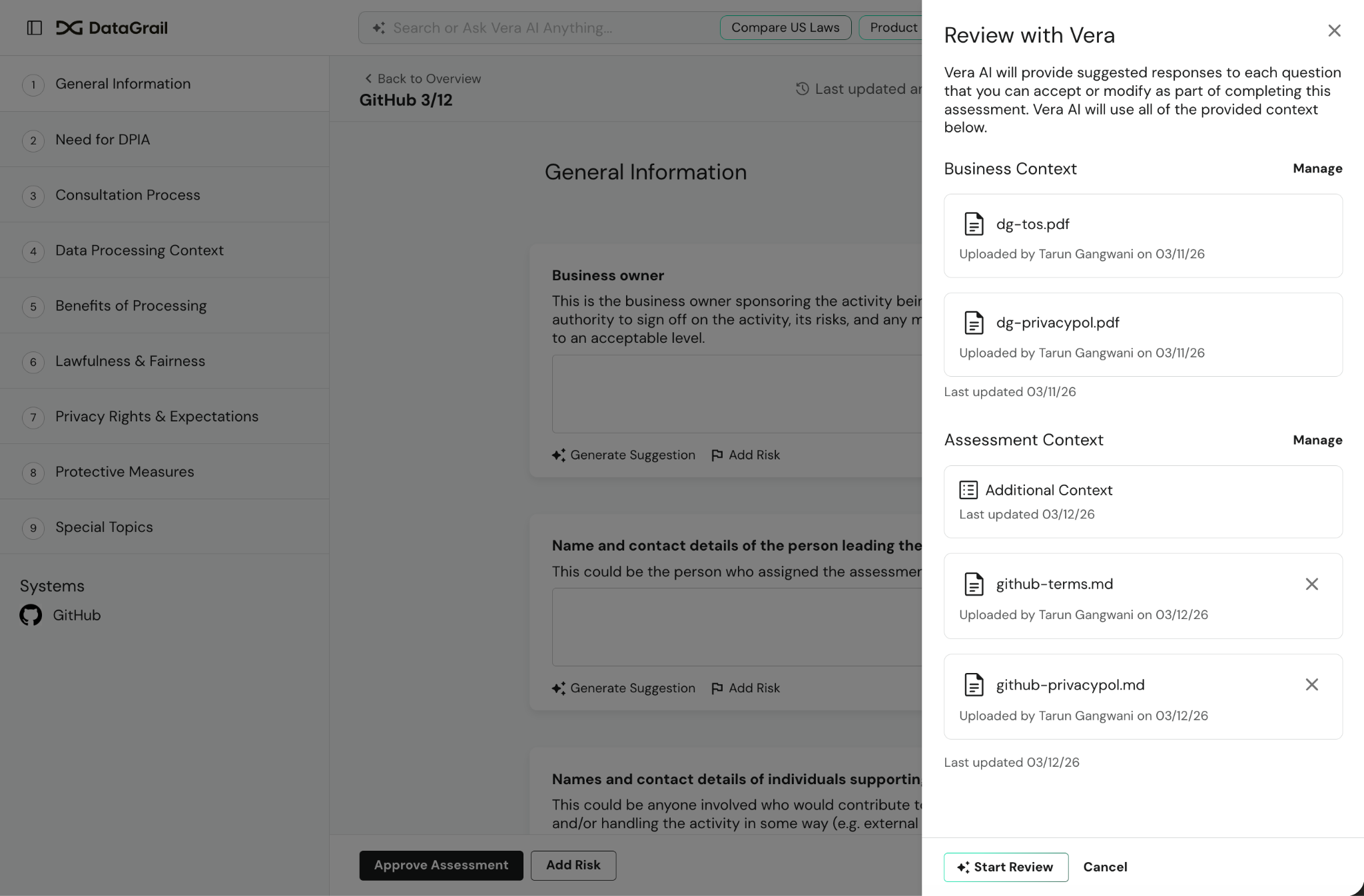
Vera can suggest answers for risk assessment questions, dramatically reducing the time it takes to complete DPIAs, PIAs, and other assessments. This is especially useful when contributors may not have deep system knowledge — Vera bridges the gap by analyzing available context to generate informed suggestions.
Two modes are available:
| Mode | Description |
|---|---|
| Full assessment review | Vera reviews the entire assessment and generates suggestions for all unanswered questions at once. |
| Individual question suggestions | Generate a suggestion for a specific question, with the option to provide additional context to refine the response. |
Context model: Vera draws on three layers of context to inform its suggestions:
- Business context — Provide context about your business that Vera uses across all assessments to inform responses
- Assessment context — Upload system documentation like PRDs, functional requirements, privacy notices, or terms of service specific to the assessment. You can also link previously approved assessments as references.
- Answer context — Vera uses all previously provided answers to inform suggestions for remaining questions
All suggestions are human governed — they must be reviewed and accepted before being applied. External contributors can also use Vera's suggestion capabilities on individual questions.
When Vera draws on a linked assessment for a suggestion, the suggestion lists it under Linked Assessment Sources, along with who approved it and when. Linked Assessment Sources are shown to DataGrail users only, not external contributors.
Assessment AutoFill is currently in beta. Contact support@datagrail.io to enable it for your organization.
For step-by-step instructions on providing context and documentation, see Assessment Context. For the full assessment workflow, see Getting Started With Risk Assessments.
Integration Error Troubleshooting
Vera can help you diagnose and resolve integration errors through the chat interface in two key contexts:
- From the Errors page — Ask Vera about your integration errors to get a summary of failing integrations, grouped by error type with counts and timestamps. Vera explains what went wrong and suggests remediation steps tailored to each error type.
- From a specific privacy request — When viewing a privacy request, ask Vera about it to see its activity log, identify integration failures in the request workflow, and get targeted troubleshooting guidance.
In both cases, Vera provides actionable, IT-oriented feedback — explaining error types, suggesting configuration fixes, and helping you identify patterns across integrations. For more details on error types and manual remediation, see Integration Errors.
Explain Automated Workflows
Vera can walk you through what a workflow automation does, step by step, without you needing to trace the logic yourself in the visual builder.
From a workflow's detail page, select Explain with Vera to open the chat interface with a prompt already asking Vera about that workflow. Vera describes the workflow's trigger, conditions, actions, and branches in the order they execute, using the same phase and condition names shown in the workflow builder.
You can also ask Vera follow-up questions about the workflow, request suggestions on how to make it more efficient, or how to build a related workflow for another request phase.
Vera can only answer questions and offer suggestions — it cannot make changes to a workflow or publish it on your behalf. You must make any edits and publish them yourself in the workflow builder.
For more on workflow automations, see Automations.
Documentation Search
External MCP clients connected to DataGrail can search the official knowledgebase directly through Vera using semantic search. Rather than switching to the help center, you can ask questions about features, configuration, workflows, and best practices from within your AI tool.
Documentation search covers all DataGrail product areas — Request Manager, Consent, Live Data Map, Integrations, Risk Management, User Management, and Platform Settings — as well as the product changelog.
Disclaimer: The information contained in this message does not constitute as legal advice. We would advise seeking professional counsel before acting on or interpreting any material.